

Common questions
FAQ, FAQs, Read all Template FAQs, Read all Meta & WhatsApp FAQs, WhatsApp Update: Per-User Marketing Template Message Limit, How do I change my Display Name?, How do I increase my daily messaging limit?, How to improve my Quality Rating on WhatsApp?, What is the process for obtaining a Blue Tick on WhatsApp?, green tick, Meta verified, messaging tier, template rejectedYour WhatsApp number
Section titled “Your WhatsApp number”How do I change my display name?
Section titled “How do I change my display name?”Change it in Meta’s WhatsApp Manager. Meta then reviews the new name and approves or rejects it, which can take up to 7 days.
How long until my display name shows on WhatsApp?
Section titled “How long until my display name shows on WhatsApp?”Usually up to 7–8 days. It also depends on three things:
- your message quality stays High
- your daily messaging limit is at least 1,000
- your Meta (Facebook) Business Manager is verified
How do I increase my daily messaging limit?
Section titled “How do I increase my daily messaging limit?”Your messaging limit is the most business-initiated conversations (marketing, utility or service templates) your number can start in 24 hours. Meta raises it in tiers as you keep sending good-quality messages. To get there:
- Keep BusinessOnBot notifications on. Order confirmation, COD confirmation and order fulfilment messages go to people who just ordered, so they are rarely reported as spam. This tells Meta you are a real business with a growing customer base.
- Send campaigns to your existing customers. As you keep messaging unique numbers, Meta raises your limit to the next tier.
How do I improve my quality rating?
Section titled “How do I improve my quality rating?”- Message only people who opted in, and give them a clear way to opt out.
- Send timely, relevant messages to the right customers.
- Don’t send too many messages in a short time.
- Check quality insights in WhatsApp Manager: the 30-day quality history, the reasons given for low or medium quality, and each template’s quality.
- Check templates added in the last 7 days. A new template may be the problem.
- Test and refine what you send, based on your quality rating and campaign results.
- Follow WhatsApp’s Business Policy and Commerce Policy.
The same habits keep your rating from dropping in the first place.
How do I prevent spam reports?
Section titled “How do I prevent spam reports?”Spam reports can get your number blocked by Meta. To avoid them:
- Segment your audience. Message only people who opted in, not cold or inactive users.
- Use clear opt-ins. Tell customers what they’ll get, for example order updates or offers.
- Don’t over-message. Too many promotional messages in a short time lead to complaints.
- Use utility templates where you can, such as order and service updates. They carry less spam risk.
- Keep messages clear and relevant. Avoid all caps, lots of emojis and urgent language.
- Watch your quality rating in WhatsApp Manager. If it drops, send fewer campaigns until it recovers.
A template footer telling customers how to opt out also helps.
How do I get a blue tick on WhatsApp?
Section titled “How do I get a blue tick on WhatsApp?”You apply to Meta for verification. First read the blue tick verification requirements, then follow the step-by-step walkthrough: Apply for green tick.
In Reason for request, give as much detail as you can:
- why your brand is notable
- your market reach in India and the customers you serve
- the countries you export to, if any
- articles that mention your revenue, awards you’ve won, and quarter-on-quarter growth
- any other data that strengthens your application
Also list non-promotional media articles that mention your brand. Meta runs its own automated check, but five strong articles help: for example, stories in YourStory, The Better India or India Today about how your brand has grown and the value it gives customers.
Want help? Contact your BusinessOnBot point of contact or support@businessonbot.com, and we can walk you through it on a call.
What is the per-user marketing message limit?
Section titled “What is the per-user marketing message limit?”Meta limits how many marketing template messages one person can receive from businesses in a given period, so people aren’t flooded. People who are less likely to read marketing messages get fewer of them.
When you send a marketing template:
- the first message opens a 24-hour marketing conversation
- if the customer replies within those 24 hours, you can send another marketing template, or as many free-form messages as you like
- if they don’t reply, more marketing messages may not be delivered
If a message is blocked by this limit, you get an error saying it was not delivered to maintain a healthy ecosystem. Don’t resend straight away: you’ll get the same error. Retry later, leaving longer gaps each time, because the limit can last for different lengths of time. See Meta’s per-user marketing template limits for details.
What is MM onboarding?
Section titled “What is MM onboarding?”It means signing up for Meta’s Marketing Messages API for WhatsApp, which improves delivery of your marketing messages. See Turn on Meta’s Marketing Messages API for WhatsApp.
Templates
Section titled “Templates”How long does template approval take, and who approves it?
Section titled “How long does template approval take, and who approves it?”Meta reviews and approves every template. It usually takes 5–10 minutes, but Meta says it can take up to 24 hours. If a template stays Pending for longer, contact support.
I get a “Meta server error” when I submit a template
Section titled “I get a “Meta server error” when I submit a template”Wait 10 minutes and create the template again with a different name. If it still fails, contact support.
Why was my template rejected?
Section titled “Why was my template rejected?”The most common reason is a category mismatch. Meta is strict with Utility templates: they must not promote a product, offer a discount or advertise an event. Content like that is marketing. If your utility template has none of this and is still rejected, contact support to appeal.
For marketing templates, see Meta’s template guidelines. To choose the right category, see What are WhatsApp templates?
What are the image and video specifications?
Section titled “What are the image and video specifications?”- Images: JPG or PNG, under 5 MB, 940 × 500 pixels.
- Videos: MP4, 940 × 500 pixels. Keep them under 10 MB.
- Sample media uploaded when you submit a template: 4 MB at most.
Images taller than a 1.91:1 aspect ratio are cropped top and bottom, so keep the important part in the centre. See media limits.
I can’t upload an image or video header
Section titled “I can’t upload an image or video header”Check that the file meets the specifications above and try again. If it still fails, contact support.
What is the character limit for the template body?
Section titled “What is the character limit for the template body?”1024 characters, including variables. The footer can be up to 60 characters.
What do I put in the sample variables?
Section titled “What do I put in the sample variables?”Samples show Meta what the message will look like when sent. Any image works as a sample image. For a variable, type something like what it will hold: if {{1}} is the customer’s name, type any name.
How do I show each customer’s name in a campaign?
Section titled “How do I show each customer’s name in a campaign?”Add a variable to the template body where the name should go. In the Excel sheet you upload for the campaign, add a column straight after phone, head it 1, and fill in each customer’s name next to their number. For more variables, add columns headed 2, 3 and so on. See Launch a campaign (Excel upload).
How do I add quick reply buttons?
Section titled “How do I add quick reply buttons?”Go to Settings → WhatsApp Templates → Create Template, choose the category and name, then scroll down to Button Type and select Quick Reply. What happens when a customer taps a button depends on the flow you set up for it in the chatbot. See Create a standard template.
What is a template footer?
Section titled “What is a template footer?”An optional short line at the bottom of the message. For example, to avoid spam reports: “Please type ‘stop’ or ‘unsubscribe’ to stop receiving messages.”
How do I view, copy or delete a template?
Section titled “How do I view, copy or delete a template?”Go to Settings → WhatsApp Templates and find the template. Under Actions, you can view, duplicate, edit or delete it. Rejected templates cannot be duplicated, and approved templates cannot be edited.

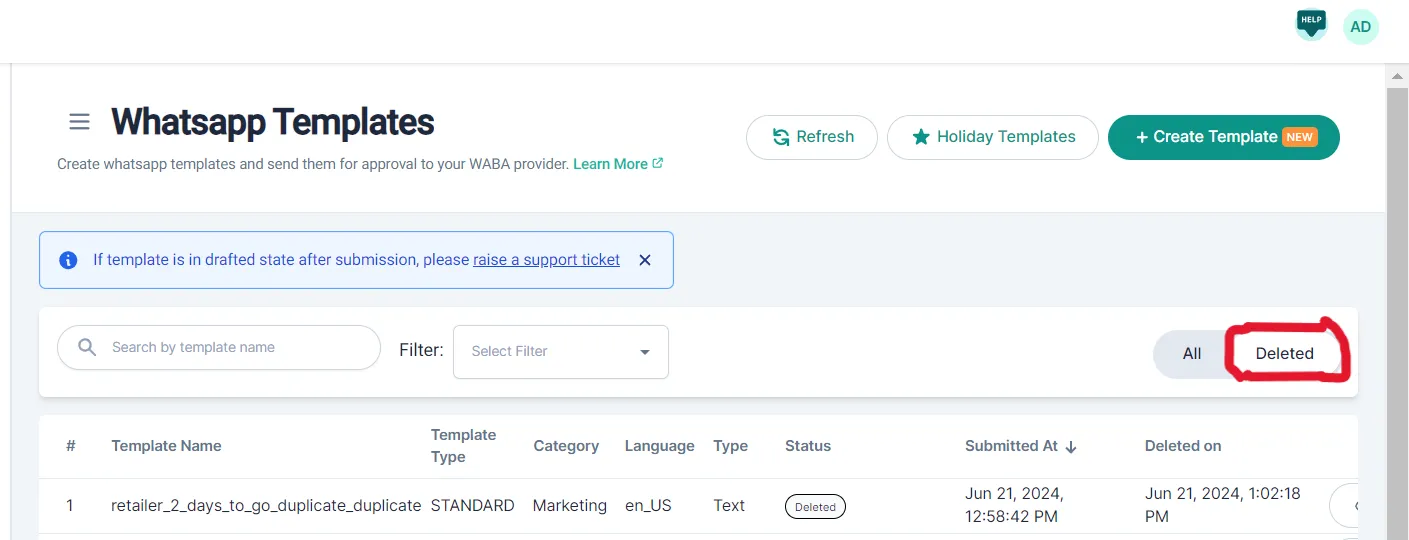
How do I find a deleted template?
Section titled “How do I find a deleted template?”Go to Settings → WhatsApp Templates and click Deleted. From there you can restore a template.
What are holiday templates?
Section titled “What are holiday templates?”Ready-made templates for holidays that you customise for your brand. Go to Settings → WhatsApp Templates → Holiday Templates, select your category and the holiday, edit the template and submit it.
Carousel templates
Section titled “Carousel templates”How many cards can a carousel have?
Section titled “How many cards can a carousel have?”From 1 to 10 cards. See Create a carousel template.
How much does a carousel template cost?
Section titled “How much does a carousel template cost?”The same as a standard template.
Can I use an image on one card and a video on another?
Section titled “Can I use an image on one card and a video on another?”No. The header type you pick for the first card (image or video) applies to every card.
Can I mix quick reply and call-to-action buttons on a card?
Section titled “Can I mix quick reply and call-to-action buttons on a card?”Yes. Each card can have two quick reply buttons, two call-to-action buttons, or one of each. The choices on the first card apply to every card.
What is the limit for the card body?
Section titled “What is the limit for the card body?”160 characters, including variables, with no more than one line break.
Was this page helpful?
Thanks, this helps us improve this page.
Still stuck? Email support@businessonbot.com