

Audit logs
Audit Logs, ticket history, activity log, ticket timelineAudit logs are a record, in time order, of every important action on a ticket: who did what, and when, from the moment the ticket is created until it closes.
Where to find them
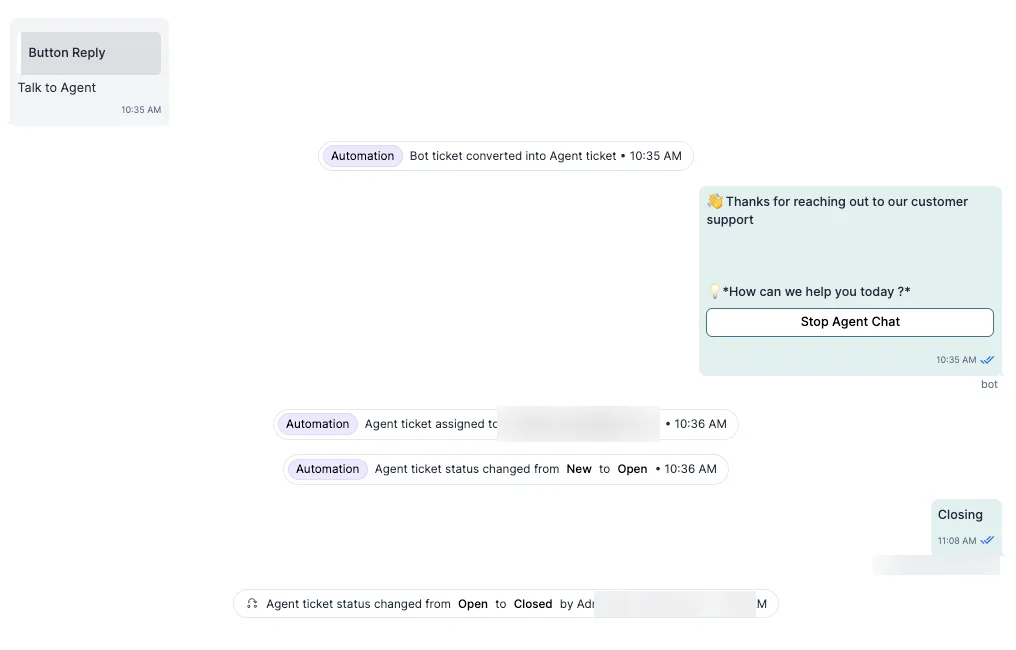
Section titled “Where to find them”Audit logs appear in the ticket timeline, alongside the messages. They look different from customer and agent messages and are labelled as system actions.
What they record
Section titled “What they record”Every entry shows the time and the person (or the system) that took the action.
| Action | Example entry |
|---|---|
| Ticket created | “Ticket created by [agent name] (Agent)” or “Created by WhatsApp user” |
| Assignment change | “Assigned to [agent name] (Agent)” or “Reassigned from Bot to Agent” |
| Status change | “Status changed from Open to Pending” |
| Tag added or removed | “Tag ‘Urgent’ added by [agent name]” or “Tag ‘High Value’ removed” |
| Bot hand-over or exit | “Bot exited the flow – ticket escalated to human agent” |
| Ticket resolved or closed | “Ticket marked as Resolved by Admin” |
| Private reply | “Private reply added by [agent name]” |
Who can see them
Section titled “Who can see them”- All agents and admins who can open a ticket can see its full audit log.
- Audit logs are read-only. Nobody can edit or delete them.
How to use them
Section titled “How to use them”- Before you reassign or escalate a ticket, check what has already been tried.
- In team reviews, use the log to walk through what happened on a ticket.
- Managers and QA teams can check how high-priority tickets and escalations were handled, and spot delays in hand-overs or steps that were skipped.
Related
Section titled “Related”Was this page helpful?
Thanks, this helps us improve this page.
Still stuck? Email support@businessonbot.com