

Sort tickets in a view
Sorting, sort tickets, oldest first, newest firstSorting puts the tickets in a view in the order you need, by when they were created or last updated. Use it to spot urgent tickets, clear old ones and keep to your response targets. Each view keeps its own sort order.
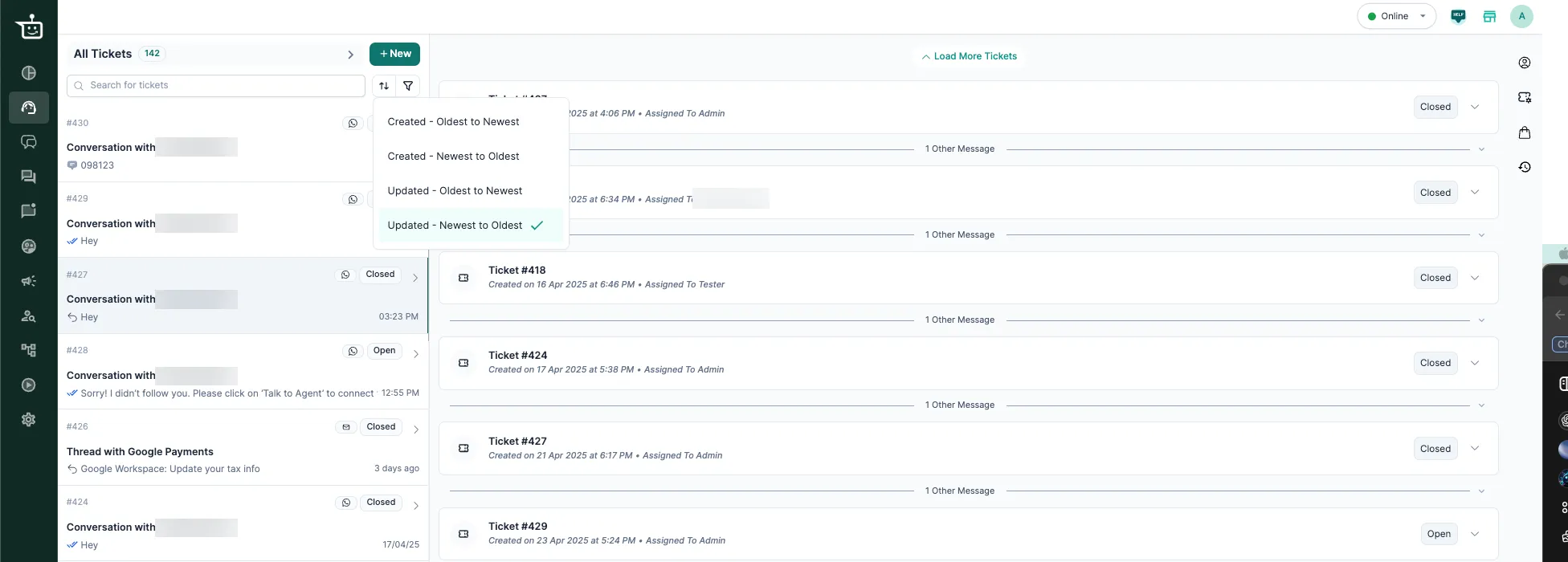
Sort options
Section titled “Sort options”| Option | What you see first | Use it to |
|---|---|---|
| Updated (Newest to Oldest) (default) | Tickets with the most recent message, from the agent or the customer | Keep up with live conversations, escalations and tickets that just became active |
| Updated (Oldest to Newest) | Tickets nobody has touched for the longest time | Find forgotten or stuck tickets |
| Created (Newest to Oldest) | The newest tickets | Answer new questions as they arrive |
| Created (Oldest to Newest) | The oldest tickets | Clear a backlog and close long-running issues first |
Good to know
Section titled “Good to know”- Sorting applies to the view you have open, so you can sort each view differently, for example open tickets versus recently resolved ones.
- You can sort by one option at a time.
- Your choice stays while you work in that view, and resets when you leave it or switch views.
Related
Section titled “Related”Was this page helpful?
Thanks, this helps us improve this page.
Still stuck? Email support@businessonbot.com