

User Segmentation panel
Overview of the Panel, User Segmentation, segments, recommended segments, customer groupsUser Segmentation splits your customer database into groups (segments) based on rules you choose. You can then send a campaign to just that group instead of to everyone.
When to use it
Section titled “When to use it”Use a segment when a message only makes sense for some customers: for example, an offer for big spenders, a reminder for cart abandoners, or a launch in one city.
What’s on the panel
Section titled “What’s on the panel”Recommended segments
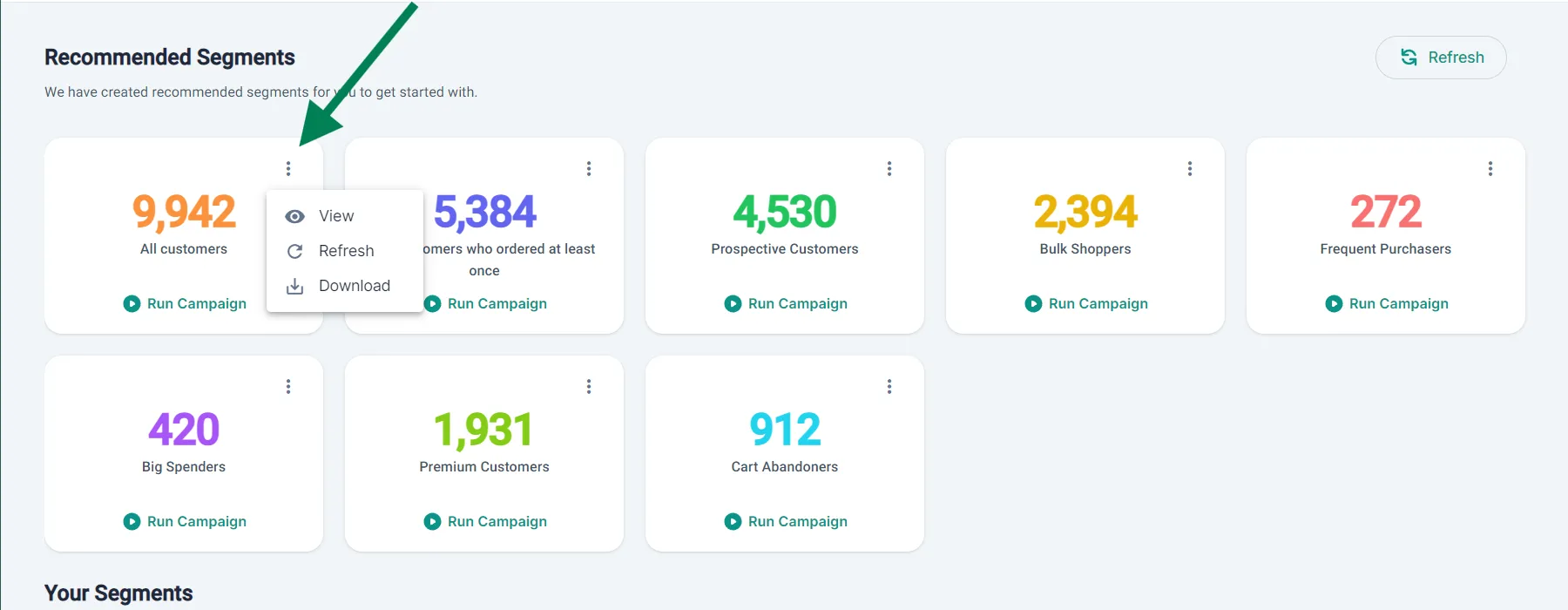
Section titled “Recommended segments”BusinessOnBot creates these segments for you, with the customer count on each card:
- All customers
- Customers who ordered at least once
- Prospective Customers
- Bulk Shoppers
- Frequent Purchasers
- Big Spenders
- Premium Customers
- Cart Abandoners
Your segments
Section titled “Your segments”Segments you create yourself are listed under Your Segments. To make one, click Create segment: see Create a customer segment.
What you can do with a segment
Section titled “What you can do with a segment”- Run Campaign: start a new campaign with this segment already added.
- ⋮ → View: open the segment.
- ⋮ → Refresh: fetch the latest customer data and update the count.
- ⋮ → Download: download the segment’s customers as an Excel file.
Watch the walkthrough
Section titled “Watch the walkthrough”Related
Section titled “Related”Was this page helpful?
Thanks, this helps us improve this page.
Still stuck? Email support@businessonbot.com