

Orders dashboard
Orders, bot orders, assisted sales, order logs, COD, prepaidThe Orders tab shows statistics for orders placed through your bot and through assisted sales, and the full history of your customers’ orders.
To open it, go to Dashboard → Orders.
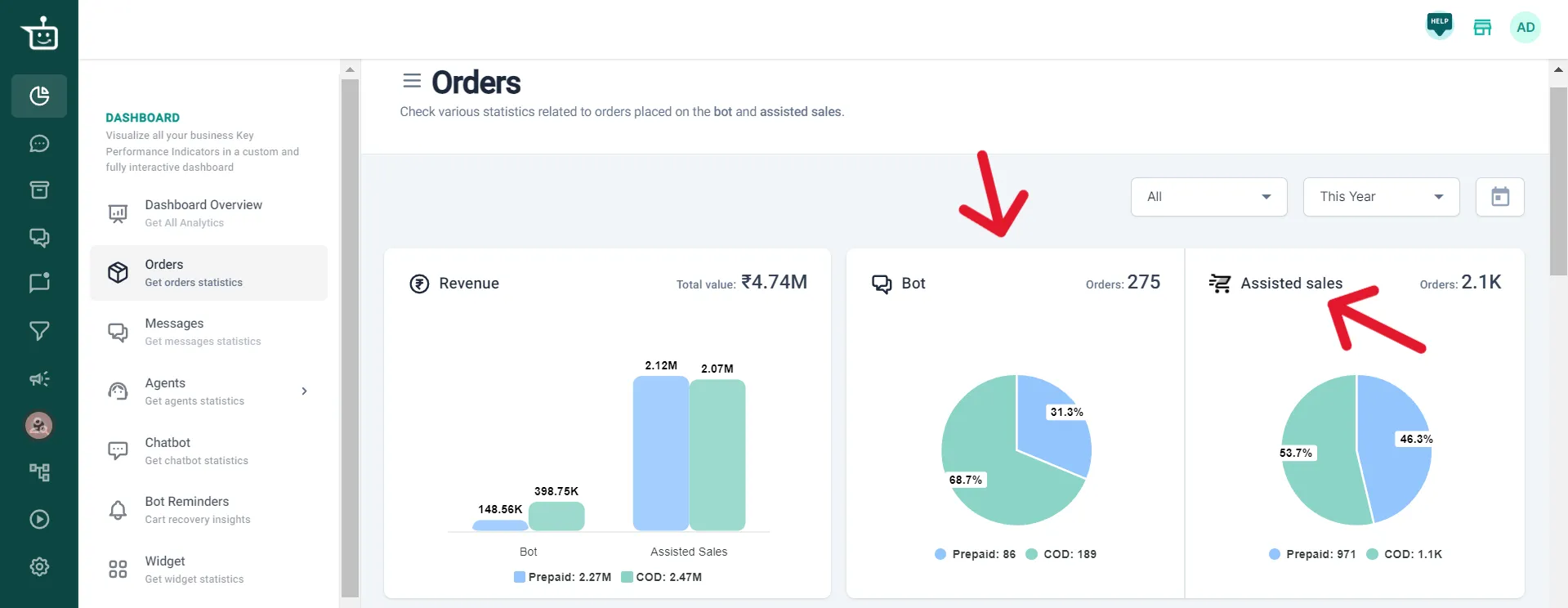
What you see
Section titled “What you see”| Section | What it shows |
|---|---|
| Revenue | A bar chart of total revenue from bot orders and assisted sales, split into prepaid and COD |
| Bot | Number of orders placed through the bot, split into prepaid and COD |
| Assisted sales | Number of orders placed through assisted sales, split into prepaid and COD |
| Order analytics | Charts of orders from the bot and assisted sales and the revenue from them, which you can view by different parameters |
| Order logs | The full history of customer orders, with transaction details, statuses and other key information |
Filters and downloads
Section titled “Filters and downloads”- Pick a time range, or a custom range, from the selector at the top right.
- To see figures for a specific checkout, choose it from the dropdown next to the time range.
- To download your order logs, scroll down to Order logs and click download. You can filter the logs by time range first.
Watch the walkthrough
Section titled “Watch the walkthrough”Related
Section titled “Related”Was this page helpful?
Thanks, this helps us improve this page.
Still stuck? Email support@businessonbot.com