

What is a WhatsApp campaign?
Campaign Overview, bulk messaging, broadcast, WhatsApp broadcast, marketing messagesA campaign sends one WhatsApp template message to many customers at once. It is also called bulk messaging or a broadcast.
When to use a campaign
Section titled “When to use a campaign”- Tell customers about a new launch, an upcoming event, or a festival or other offer.
- Grow revenue by teaching customers about your brand and products.
- Keep in touch with customers between orders.
To send a message automatically when something happens (for example, 20 days after an order), use a smart automation instead. Campaigns go out to a whole list at once.
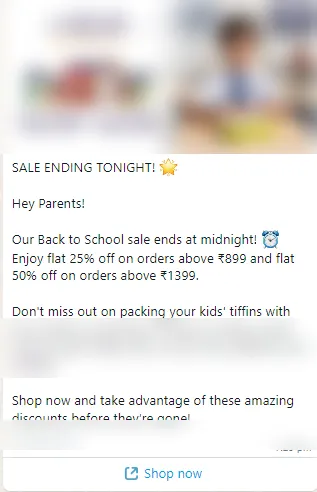
This is how a campaign message looks on the customer’s phone:
Ways to reach customers
Section titled “Ways to reach customers”- WhatsApp campaigns send an approved template to a list of customers. This section covers them.
- AI Voice campaigns have an AI caller phone your customers and follow up on WhatsApp. See Set up an AI Voice campaign.
How a WhatsApp campaign is built
Section titled “How a WhatsApp campaign is built”Every campaign goes through six steps on the New Campaign page:
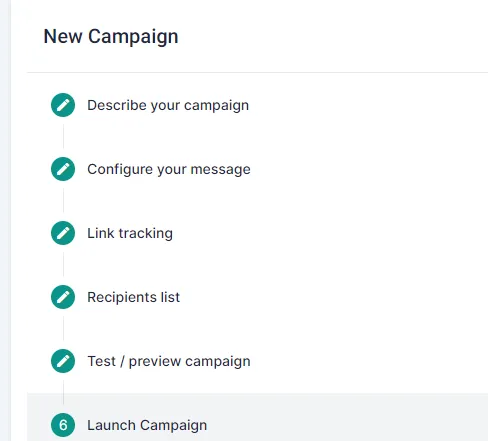
- Describe your campaign: name it and choose how customer replies are handled.
- Configure your message: pick an approved template and fill its variables.
- Link tracking: add UTM parameters to your links.
- Recipients list: upload an Excel sheet or pick a customer segment.
- Test / preview campaign: send the message to your own numbers first.
- Launch Campaign: send it now or schedule it.
For the full steps, see Launch a campaign from an Excel sheet or Launch a campaign to a customer segment.
Before you launch
Section titled “Before you launch”Related
Section titled “Related”Was this page helpful?
Thanks, this helps us improve this page.
Still stuck? Email support@businessonbot.com