

Add a private reply to a ticket
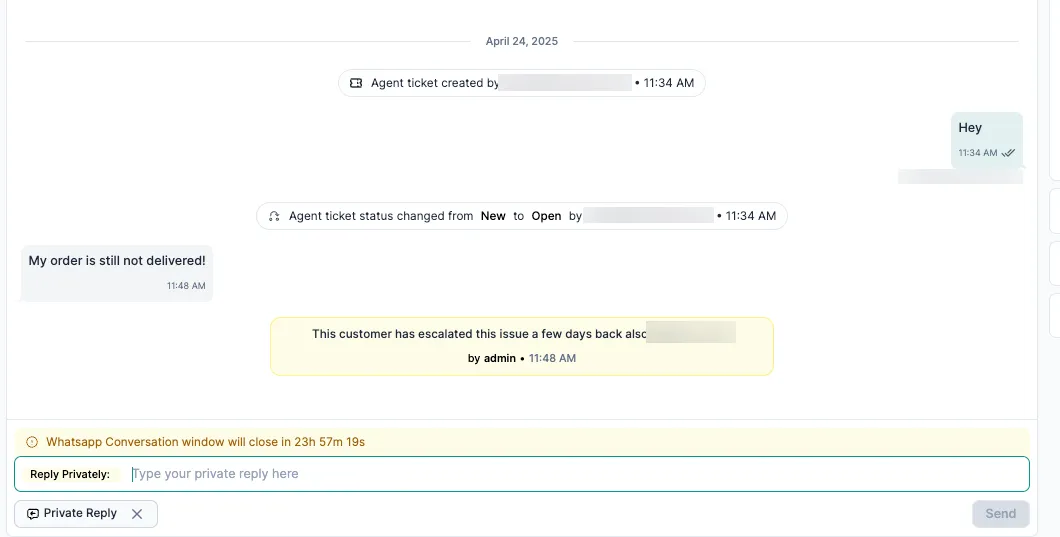
Private Replies, private note, internal note, notesA private reply is an internal note on a ticket. Your team can see it; the customer can’t. Use private replies to keep context when a ticket changes hands, is escalated or runs across shifts.
Add a private reply
Section titled “Add a private reply”-
Open the ticket.
-
In the message box at the bottom, switch to the Private Reply tab.
-
Type your note, for example context for the next agent, follow-up notes or next steps.
-
Click Send. The note appears in the ticket timeline, marked as internal.
How private replies work
Section titled “How private replies work”| Internal only | Never sent to the customer. Only team members who can open the ticket see it. |
| Recorded | Each private reply shows who wrote it and when. Private replies also appear in the ticket’s audit log. |
| No limit | Add as many as you need while the ticket is open. |
| On closed tickets | You can add private replies even after a ticket is closed, for example to record why it was closed. |
When to use them
Section titled “When to use them”- Hand-over: leave context for the person taking over the ticket.
- Teamwork: ask an admin or a specialist to take action.
- Root cause: record what caused the problem.
- Escalation: explain why the ticket is being escalated.
- After closing: note why a ticket was resolved or closed.
You can also make a private reply required before agents resolve a ticket. See Require a tag or private reply before resolving a ticket.
Related
Section titled “Related”Was this page helpful?
Thanks, this helps us improve this page.
Still stuck? Email support@businessonbot.com