

Bot Analytics
Support Analytics, bot performance, bot tickets, bot deflection, transferred to agentBot Analytics shows how much of your support your bot handles without an agent.
To open it, go to Dashboard → Support Analytics → Bot.
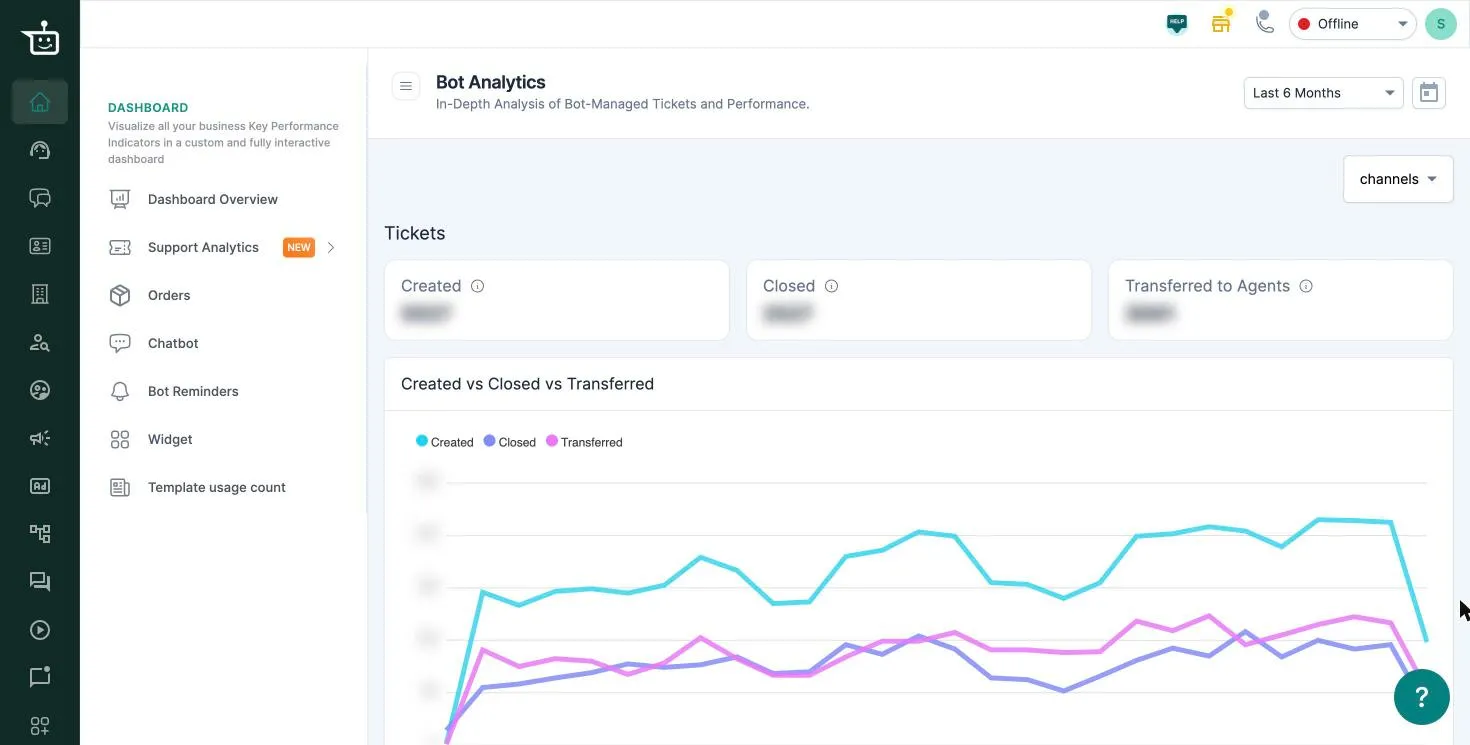
Filters
Section titled “Filters”- Date range: Last 6 Months by default, or click the calendar for a custom range.
- channels: limit the numbers to one or more channels. Email tickets aren’t included on this screen.
Tickets
Section titled “Tickets”| Tile | What it counts |
|---|---|
| Created | Tickets that started with the bot in the range, including ones later passed to an agent |
| Closed | Tickets the bot closed itself, by the date they were closed |
| Transferred to Agents | Tickets that started with the bot and were handed to an agent. These are part of Created |
Created vs Closed vs Transferred plots all three over time.
A quick health check: Transferred to Agents ÷ Created is the share of bot conversations that needed a person. If it rises, look at what customers are asking in those chats and add answers to your bot.
Customer Satisfaction
Section titled “Customer Satisfaction”If customer ratings are turned on for bot conversations, this section shows the rating status distribution, engagement and response rate. It shows NA until there are ratings to show.
Related
Section titled “Related”Was this page helpful?
Thanks, this helps us improve this page.
Still stuck? Email support@businessonbot.com