

Choose what happens at the end of a flow
End Journey Actions, end journey, transfer to bot, assign to agent, Agent ChatThe end journey is the last step of a flow. Its action decides who handles the customer’s chat after the flow ends. With every action you can also send a message.
End journey actions
Section titled “End journey actions”| Action | What happens |
|---|---|
| Transfer to Bot | The bot handles the chat, with no manual involvement. You can send product recommendations here. |
| Send to Agent Chat | The customer’s replies go to the Support Inbox, where your support team picks them up. |
| Assign to Agent | The chat goes to one specific agent and shows in that agent’s assigned chats. Use it when certain agents look after certain parts of your operations. |
| Do nothing | The bot does not reply to the customer’s first message. If the customer replies again, the bot takes over. |
Set the end journey
Section titled “Set the end journey”- In your flow, on the button, list row or message where the journey should finish, choose End journey.
- Choose the action.
- For Assign to Agent, choose the agent from the list. Agents must be created in Settings first. See Manage agents.
- Optionally, add a message to send with the action.
If a message has buttons or list rows, set the end journey for each row separately.
Send product recommendations at the end
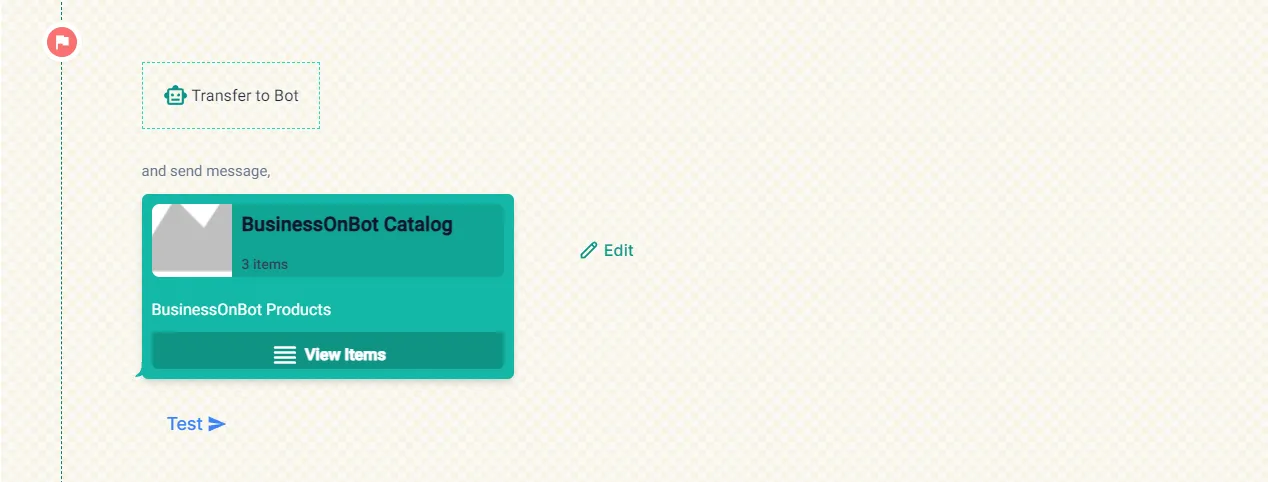
Section titled “Send product recommendations at the end”- Choose Transfer to Bot.
- Add a message and choose Send product recommendations, then pick the products.
- Click Test under the catalog message to send it to your own number. The number you test with must be in an active conversation with your WhatsApp number.
Your catalog must be synced first (Bot Configuration → Product Catalog → Catalog Sync). See Sync your Shopify or WooCommerce catalog.
Watch the walkthrough
Section titled “Watch the walkthrough”Related
Section titled “Related”Was this page helpful?
Thanks, this helps us improve this page.
Still stuck? Email support@businessonbot.com