

Filter and analyse chats in the Support Inbox
Chat Analysis and filtering, Transcripts, Transcript, Agent Chat, filter chats, chat tagsGoal: turn your WhatsApp chat history into action: reply in real time, follow up on recent conversations, track agent performance and spot issues many customers report.
Who it’s for
Section titled “Who it’s for”Support leads and agents who handle WhatsApp chats in the BusinessOnBot Support Inbox (previously called Transcripts).
The recipe
Section titled “The recipe”1. Watch live conversations
Section titled “1. Watch live conversations”The Live section shows who is chatting with your brand on WhatsApp right now, so agents can help and answer questions in real time. All shows the full chat history.
Go to Support Inbox → WhatsApp → Live.
2. Filter by date
Section titled “2. Filter by date”- Recent chats: follow up on ongoing conversations and make sure nobody waits too long.
- Past chats: look for trends in customer behaviour to plan how you engage.
Go to Support Inbox → WhatsApp → All, click the filter icon and choose the date range.
3. Filter by agent
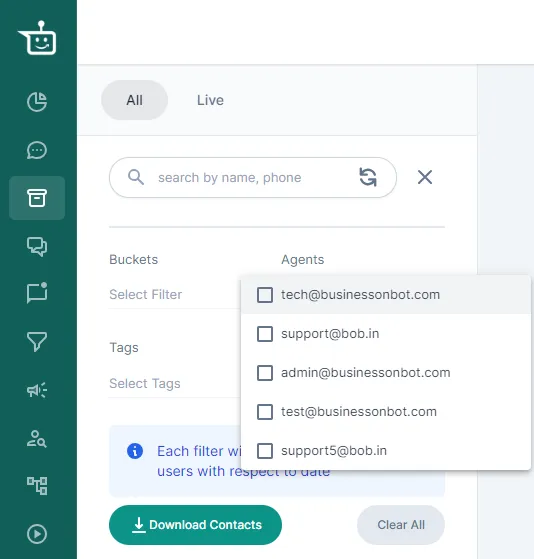
Section titled “3. Filter by agent”- Track performance: see each agent’s chats to find what to improve and where to train.
- Match expertise: send specific types of questions to the agents who know them best.
Go to Support Inbox → WhatsApp, click the filter icon and choose the agent.
4. Filter by tag
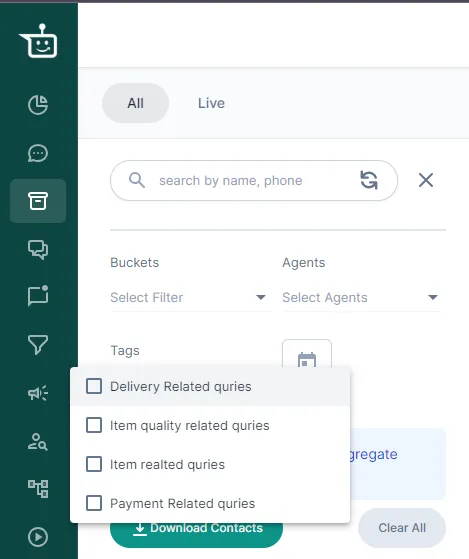
Section titled “4. Filter by tag”Agents can tag chats with labels such as VIP customer, urgent, Delivery related issue or product inquiry, so they can find them again for follow-up.
Go to Support Inbox → WhatsApp, click the filter icon and choose a tag to see how many unique customers reported the same issue.
Related
Section titled “Related”- Find the chats that matter with customer segments
- Views & filters
- Managing custom tags
- Support Inbox: common questions (including how to message inactive customers outside the 24-hour window)
Was this page helpful?
Thanks, this helps us improve this page.
Still stuck? Email support@businessonbot.com